AI-powered design visualization: a homeowner's guide
AI-powered design visualization: a homeowner's guide

TL;DR:
- AI-powered design visualization transforms traditional, time-consuming renovations into quick, cost-effective processes by creating realistic 3D previews from floor plans or photos. It enables real-time iteration, sharing, and customization without requiring design skills, significantly improving project efficiency and decision-making. This technology empowers homeowners and property managers to explore diverse styles confidently, reducing mistakes and fostering collaborative, emotionally resonant spaces.
Visualizing your home renovation used to mean hiring a designer, waiting weeks for hand-drawn renderings, and spending thousands before a single wall was painted. Most homeowners and property managers assume that’s still the reality. It is not. AI-powered design visualization has changed the rules entirely, turning a slow, expensive process into something you can do yourself in minutes. This guide explains exactly what it is, how it works, and how you can use it to make smarter, faster decisions about your property.
Table of Contents
- Understanding AI-powered design visualization
- How AI improves interior design visualization workflows
- Key features of AI-powered design visualization tools for homeowners and property managers
- Comparing traditional vs AI-powered visualization approaches
- Applying AI-powered visualization for your renovation planning
- The future of interior design visualization: an insider’s perspective
- Streamline your renovation with AI-powered visualization from VibeMyFlat
- Frequently asked questions
Key Takeaways
| Point | Details |
|---|---|
| Speed and efficiency | AI-powered visualization drastically reduces design rendering time from weeks to minutes or seconds. |
| Enhanced collaboration | Interactive 3D models allow homeowners and property managers to align expectations early and avoid surprises. |
| Creative exploration | AI enables rapid iteration over multiple design styles, layouts, and lighting scenarios for better decision-making. |
| Accessible technology | Modern AI visualization tools are user-friendly, requiring little to no design expertise to use effectively. |
| Improved renovation outcomes | Using AI visualization in planning reduces costly mistakes and supports clearer communication throughout projects. |
Understanding AI-powered design visualization
At its core, AI-powered design visualization is the use of artificial intelligence to convert flat floor plans, room photos, or rough ideas into realistic, three-dimensional previews of an interior space. Think of it as giving your imagination a visual voice without needing a CAD software degree or a professional renderer on your payroll.
Here is what makes it genuinely different from older methods:
- Speed at scale. AI tools convert 2D floor plans to interactive 3D models in minutes, enabling 5 to 10 layout variations for client review during a single first meeting.
- Real-time iteration. You can swap out a sofa, change a wall color, or reposition a doorway instantly, rather than waiting days for a revised rendering.
- Shared understanding. When a homeowner and a contractor are both looking at the same 3D model, miscommunication drops sharply. Everyone sees the same outcome before any work begins.
- Lower barrier to entry. No design background is required. Modern AI tools are built for plain-language interaction, so you describe what you want in everyday terms and the tool handles the visual translation.
The underlying technology pulls from machine learning in design, training on thousands of real interiors to understand how light, materials, and furniture interact in a space. That training is what allows AI to generate results that look believable rather than cartoonish. When you save time and avoid mistakes with AI, you are drawing on that accumulated design knowledge every time you make a change.
Property managers benefit here too. Instead of trying to describe a proposed renovation to a tenant or a board over email, you can share a walkable 3D preview and get a yes or no in the same afternoon.
How AI improves interior design visualization workflows
Traditional visualization has a fundamental problem: it is linear. A designer produces a rendering, you review it, request changes, and wait again. Each cycle costs time and money. For a full renovation project, those cycles can add up to weeks of lost momentum.
AI collapses that cycle dramatically. Here is how the workflow shift looks in practice:
- Upload your starting point. You provide a floor plan, a photo of your current room, or even a rough sketch.
- Generate multiple concepts at once. Instead of one rendering, AI produces several styled variations simultaneously, giving you genuine options rather than a single take-it-or-leave-it result.
- Iterate in real time. Change lighting conditions, swap materials, or test a completely different layout without starting over from scratch.
- Share and get feedback. Send a link or an image to a contractor, co-owner, or tenant and collect input before any physical work begins.
- Finalize with confidence. You move into your renovation knowing exactly what the finished space should look like.
The efficiency gains are not marginal. 86% of architects report improved efficiency from AI-powered visualization tools, with many saving over 5 hours per week on rendering and iteration tasks. For homeowners managing a single project, that translates to fewer contractor meetings, faster decisions, and less second-guessing.
“Traditional rendering workflows take days to weeks, but AI-powered tools produce photorealistic images in seconds to minutes.”
That speed change is not just convenient. It is psychologically freeing. When revisions are cheap and fast, you are willing to explore bolder ideas. You stop playing it safe because the cost of being wrong is nearly zero.
Pro Tip: Run at least three different style concepts through your AI tool before committing to any one direction. The contrast between options often reveals what you actually want far more clearly than working from a blank slate.

Looking at AI-driven design tools for renovation will give you a deeper sense of which workflow improvements matter most depending on your project scope.
Key features of AI-powered design visualization tools for homeowners and property managers
Not all AI design tools are built the same way, but the best ones share a common set of features that make them genuinely useful for non-designers.
Natural language prompts. You should be able to type something like “warm lighting, dark wood floors, Scandinavian minimalist style” and see that reflected in the visualization. AI-assisted rendering uses natural language prompts to generate visuals without manual setup, which removes the steep learning curve that kept these tools out of reach for most homeowners.
Photorealistic rendering. A visualization that looks like a video game screenshot does not help you make confident decisions. The best tools produce images that are detailed enough to show how afternoon sunlight will hit a kitchen countertop or how a dark paint color will make a small bedroom feel.
Virtual staging and 3D walkthroughs. For property managers especially, this is where AI visualization techniques deliver serious value. Instead of physically staging an empty unit for showings, you can generate a fully furnished 3D walkthrough in hours. Cloud-native 3D digital twins for interiors allow scalable generation of brand-safe visuals across styles and configurations, which matters when you are managing multiple units or properties.
- Style toggling. Switch between modern, traditional, industrial, and other aesthetics in a single click to see which direction suits the space.
- Material and finish libraries. Test actual product finishes, not generic placeholders, so your visualization reflects real purchase decisions.
- Collaboration tools. Share, comment, and approve directly within the platform so decisions do not get lost in email threads.
Pro Tip: Use the style toggling feature to show two dramatically different versions of the same room to anyone who needs to approve your renovation plans. Strong contrast speeds up decisions because it forces a concrete preference rather than vague feedback.
The AI makeover guide for 2026 walks through exactly how to use these features step by step for common renovation scenarios.
Comparing traditional vs AI-powered visualization approaches
The differences between traditional and AI-powered methods are significant enough to affect not just your timeline, but your entire renovation experience.
| Factor | Traditional visualization | AI-powered visualization |
|---|---|---|
| Time to first render | Days to weeks | Minutes to seconds |
| Cost per revision | High (designer fees) | Near zero |
| Number of variations | Typically 1 to 2 | 5 to 10 or more |
| Client involvement | Review after the fact | Live, interactive |
| Skill required | Professional designer | Any homeowner |
| Accuracy to floor plan | Dependent on designer | Geometry-accurate from upload |
| Iteration speed | Slow, linear | Real-time |
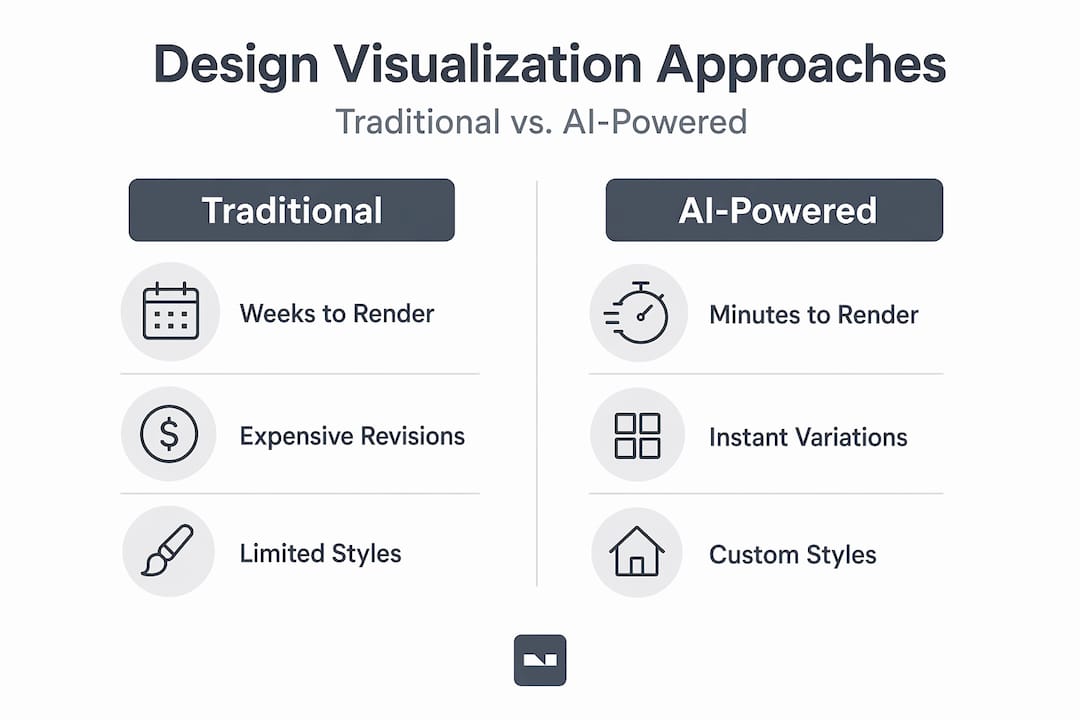
Traditional rendering workflows take days to weeks, while AI tools deliver photorealistic images in seconds to minutes. That is not an incremental improvement. It is a fundamentally different relationship with the design process.
A few other advantages worth noting:
- You avoid the “telephone game” problem where your verbal description of a design idea gets interpreted differently by each person involved.
- You can test risky design choices, like bold accent walls or open-plan layouts, without committing real resources.
- Property managers can produce professional-looking visuals for listings without hiring a staging crew or a professional photographer.
- 86% of architects report improved efficiency from these tools, which signals that even trained professionals find AI faster than their traditional methods.
For more applications of this comparison in real home projects, the innovative AI home interior ideas resource covers creative use cases worth exploring.
Applying AI-powered visualization for your renovation planning
Knowing what AI-powered visualization is and knowing how to actually use it in your next project are two different things. Here is a practical approach that works for both homeowners and property managers.
- Upload your floor plan or room photo. Most AI visualization platforms accept JPEGs, PDFs, or even smartphone photos as starting points. Accuracy improves with better inputs, so use the clearest image you have.
- Generate multiple styled concepts. Ask the tool for at least three distinct style directions. This is not about picking a winner immediately. It is about getting your preferences on the table in concrete visual form.
- Invite stakeholders to a live review. Walk through the 3D model together, whether that is a spouse, a business partner, or a prospective tenant. AI tools provide geometry-accurate 3D bases from floor plans, preventing “I didn’t imagine it that way” surprises by aligning everyone’s view early.
- Test specific decisions. Lighting placement, furniture scale, and flooring material are the three factors that most often cause post-renovation regret. Use the AI tool to test all three before you buy anything.
- Revisit as plans evolve. Renovation scopes change. Your visualization should update with them. Treat it as a living document, not a one-time deliverable.
Pro Tip: When testing lighting options, look at your visualization at both day and night settings. A room that looks great with natural daylight can feel completely different under artificial light, and catching that mismatch before installation saves real money.
For a broader look at the benefits this approach delivers to your photo-based planning process, the AI benefits for interior photo transformation article is worth reading alongside your planning.
The future of interior design visualization: an insider’s perspective
Most articles on AI in creative design focus on the time savings and stop there. That framing undersells what is actually happening.
The more interesting shift is what happens to your relationship with the design process when iteration becomes nearly free. Traditional visualization made homeowners passive. You described what you wanted, waited for a professional’s interpretation, and either accepted it or started the cycle again. The cost of being wrong was high, so most people played it safe and defaulted to whatever their designer suggested.
AI changes that power dynamic. When you can generate ten different versions of your living room in an afternoon, you develop a design opinion that is actually yours, not a compromise shaped by constraints. AI transforms linear design visualization into a dynamic iterative loop, allowing teams to explore dozens of ideas in a single session. That applies equally to a homeowner planning a kitchen remodel and a property manager refreshing a rental portfolio.
There is also a storytelling dimension that rarely gets discussed. When you share a photorealistic 3D walkthrough of a space, you are not just communicating a plan. You are creating a shared vision that other people can emotionally respond to. Tenants feel more comfortable agreeing to renovations when they can see the finished result. Family members align faster on decisions. Contractors ask better questions because they understand the intent, not just the measurements.
The concern that AI will replace human creativity in design is, frankly, backwards. What it actually does is lower the cost of exploring human creativity. The judgment about what makes a space feel like home still belongs entirely to you. AI just makes it easier to see your own ideas clearly enough to trust them.
Explore more on how AI-driven design tools insights are reshaping what homeowners can accomplish independently.
Streamline your renovation with AI-powered visualization from VibeMyFlat
Ready to experience the benefits of AI-powered visualization firsthand? Everything covered in this guide, from rapid 3D modeling to photorealistic renders and real-time style toggling, is available in one place.

VibeMyFlat is built specifically for homeowners and property managers who want professional-quality visualization without the professional-level complexity. Describe the changes you want in plain language, upload a photo of your room, and see realistic results in under 30 seconds. No design background needed, no expensive software to learn, and no waiting days for a renderer to get back to you. Whether you are planning a full renovation or testing a single room refresh, VibeMyFlat gives you the visual clarity to move forward with confidence.
Frequently asked questions
What exactly is AI-powered design visualization?
AI-powered design visualization uses artificial intelligence to quickly transform 2D floor plans and ideas into interactive 3D models and photorealistic images. AI tools convert 2D floor plans to interactive 3D models in minutes, so you can see design outcomes before any renovation work begins.
How much time can AI tools save compared to traditional methods?
AI can reduce visualization times from days or weeks to minutes or seconds. 86% of architects report improved efficiency from AI-powered visualization tools, with many saving over 5 hours per week on rendering and iteration tasks alone.
Can AI visualization help me avoid design mistakes in renovation?
Yes. By generating geometry-accurate 3D models from your floor plan, AI lets you preview layouts, materials, and furniture placement in detail before committing. AI tools prevent surprises by aligning your expectations with what the finished space will actually look like.
Do I need design skills to use AI-powered visualization tools?
No design background is required. Most platforms accept plain-language descriptions and room photos as inputs, making the tools accessible to any homeowner or property manager regardless of technical experience.
Are AI-generated designs customizable to my style preferences?
Yes. AI-assisted rendering uses natural language prompts to generate visuals without manual setup, letting you specify lighting, materials, furniture style, and color palette in everyday language until the result matches your vision.