AI tools for property photo enhancement: a complete guide
AI tools for property photo enhancement: a complete guide
TL;DR:
- AI photo enhancement makes listing photos polished and attractive using quick, easy tools accessible to all.
- Proper input quality and ethical editing are essential to maintain buyer trust and avoid misrepresentation.
- Combining AI with good staging and lighting maximizes property appeal and results in faster sales.
Most real estate agents and homeowners assume you need a professional photographer with a high-end camera and a full editing suite to produce listing photos that actually stop buyers mid-scroll. That assumption costs time, money, and opportunities. AI-driven photo enhancement tools have completely changed what’s possible, and they’re now accessible to anyone with a smartphone and five minutes to spare. This guide walks you through exactly what property photo enhancement means, how AI makes it work, a practical step-by-step process, and the ethical guardrails you need to keep buyers trusting what they see.
Table of Contents
- Understanding property photo enhancement
- How AI transforms property photo editing
- Step-by-step guide: Enhancing your property photos with AI tools
- Common pitfalls and ethical tips for AI photo enhancement
- Why input quality and ethics define property photo enhancement success
- Enhance your property photos with VibeMyFlat
- Frequently asked questions
Key Takeaways
| Point | Details |
|---|---|
| AI makes editing accessible | AI-driven photo enhancement lets anyone create stunning residential images using everyday snapshots. |
| Input quality matters most | High-quality original photos produce the best results when enhanced by AI tools. |
| Ethics and trust are critical | Over-editing can hurt buyer trust—honest enhancements deliver better long-term results. |
| Step-by-step process available | Following a clear workflow ensures listing photos are both attractive and authentic. |
Understanding property photo enhancement
Property photo enhancement is the process of improving raw listing images so they look polished, well-lit, and visually appealing without misrepresenting the actual space. It covers everything from correcting exposure and white balance to removing distracting clutter, sharpening details, and making colors pop. The goal is always the same: show the property at its absolute best while keeping the result honest and accurate.
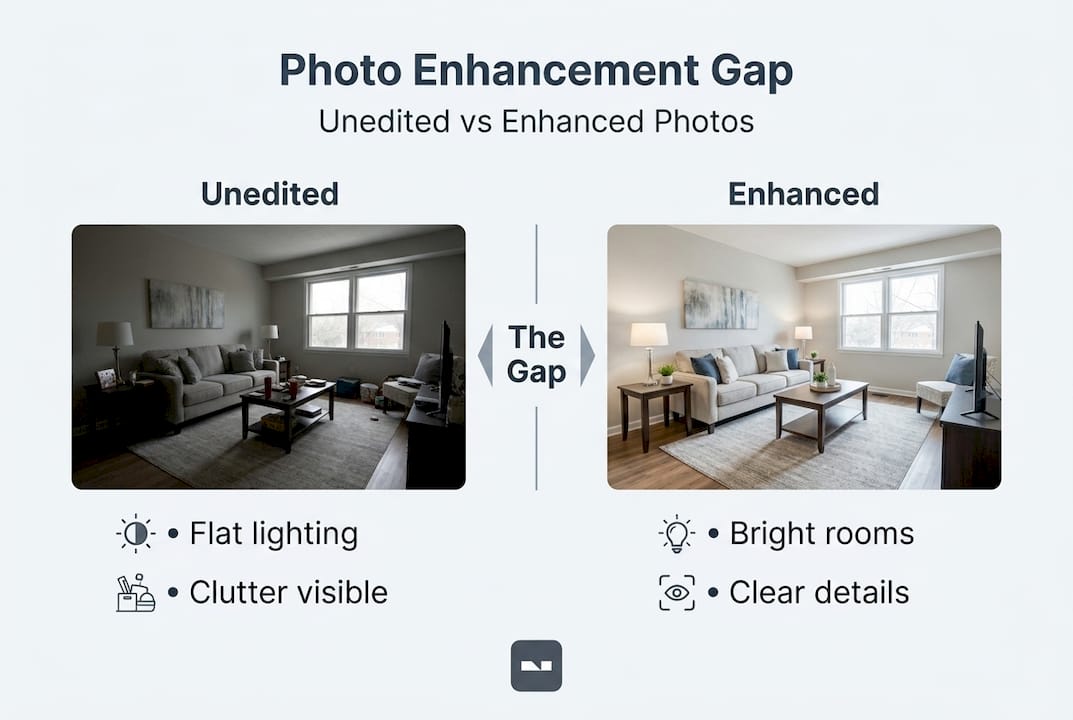
The gap between an unedited photo and an enhanced one is wider than most people expect. An unedited shot taken with a phone camera in a poorly lit room can look dark, cramped, and uninviting. The same room, with corrected lighting, balanced colors, and minor staging adjustments applied digitally, can look bright, spacious, and welcoming. Neither image is misleading when done right. One just shows the property in its best light, literally.
Why does this matter so much for listings? Because buyers form an opinion about a property within seconds of seeing its photos online. They’re not reading the description first. They’re deciding whether to click, save, or scroll past based entirely on what the photos communicate. Elevated property visuals are no longer a luxury for high-end listings. They’re a baseline expectation across every price point.
Here’s what proper photo enhancement actually includes:
- Lighting correction: Brightening dark rooms, reducing harsh shadows, and balancing mixed light sources
- Color grading: Making whites look white, greens look lush, and wood tones look warm
- Perspective correction: Straightening walls and floors so rooms look proportional
- Clutter removal: Digitally eliminating personal items, cords, or staging issues that distract
- Sky replacement: Swapping dull, overcast skies for clean blue ones in exterior shots
- Virtual staging: Adding furniture to empty rooms so buyers can visualize the space
Professional photo editing boosts property appeal by 95%, which directly affects how many buyers request showings and how quickly offers arrive. That’s not a small edge. That’s the difference between a listing that sits and one that sells.
“The quality of a property’s listing photos is one of the strongest signals buyers use to judge whether a home is worth their time. Enhanced images aren’t about deception. They’re about doing justice to a space that deserves to be seen properly.” — Property marketing professional
When it comes to boosting home value, the visual presentation of a property carries enormous weight. Buyers often make emotional decisions before rational ones, and a beautifully presented listing gives them permission to feel excited before they ever walk through the door.
How AI transforms property photo editing
Traditional photo editing requires skill, software like Adobe Lightroom or Photoshop, and hours of careful manual work. A professional retoucher can charge anywhere from $5 to $50 per image depending on the complexity of the edits. For an agent managing 20 active listings with 25 photos each, that math gets uncomfortable fast. AI changes the entire equation.
AI photo editing tools use machine learning models trained on millions of property images to understand what good lighting looks like, what a clean background should look like, and how to correct color casts without making the result look artificial. They don’t just apply a generic filter. They analyze the specific contents of each image and apply targeted adjustments. AI photo editing explained covers the full range of what these models can detect and correct in a single pass.

The speed advantage alone is staggering. Where a human editor might spend 20 to 45 minutes on a single image, an AI tool can process the same photo in under 30 seconds. For a full listing package of 30 photos, that’s the difference between a two-day turnaround and a 15-minute workflow. The fast photo editing benefits extend beyond just time saved. Faster turnarounds mean listings go live sooner, which directly affects days on market.
Here’s how manual editing and AI-powered editing compare:
| Factor | Manual editing | AI-powered editing |
|---|---|---|
| Cost per image | $5 to $50 | $0.10 to $2 |
| Time per image | 20 to 45 minutes | Under 30 seconds |
| Skill required | Intermediate to advanced | None |
| Consistency | Varies by editor | Highly consistent |
| Scalability | Limited by editor hours | Unlimited |
| Quality ceiling | Very high with expert editors | High with good inputs |
The accessibility advantage is what makes AI genuinely revolutionary here. A homeowner preparing to sell doesn’t need to learn Photoshop or hire a retoucher. Best AI real estate photo editing tools now democratize professional editing for agents and homeowners alike, enabling quick MLS-ready photos from basic phone shots. That’s a shift that simply wasn’t possible five years ago.
AI tools are also surprisingly good at following photo styling tips that interior designers spend years mastering. Models trained on well-styled interiors can recognize when a color scheme feels off or when a room’s proportions aren’t being flattered and apply adjustments accordingly.
Pro Tip: The quality of your original input image directly impacts what AI can do with it. A blurry, extremely dark photo taken in a messy room will produce mediocre results even with the best AI tool. Clean up the space, open the blinds, and shoot with a stable hand before uploading. AI is an enhancer, not a miracle worker.
Step-by-step guide: Enhancing your property photos with AI tools
Now let’s get practical. Here’s a straightforward process that works whether you’re a first-time seller, an experienced agent, or a property manager handling multiple units at once.
-
Choose the right AI tool for your needs. Look for platforms that specialize in real estate or interior photo editing rather than general photo editors. Specialized tools understand room proportions, lighting contexts, and the specific types of corrections that make listing photos work. Review the editing steps guide to understand what to look for in a quality AI platform.
-
Capture or select your best input images. AI produces its best results when given a clean, reasonably well-lit starting point. Before you shoot, declutter every surface, remove personal photos, and open all window coverings. Use a wide-angle lens if available, and shoot from corner positions to maximize perceived room size. Good lighting for photos makes a measurable difference even before AI processing begins.
-
Upload images to your chosen AI platform. Most modern tools accept JPEG and PNG files directly from your phone or camera roll. Some platforms, like VibeMyFlat, even let you describe what changes you want using plain language. You might type “brighten the room and make the wall color warmer” and the AI interprets and applies those instructions automatically.
-
Apply enhancements using presets or manual controls. Many tools offer one-click enhancement presets designed specifically for real estate photography. These are a great starting point. From there, you can fine-tune specific elements like sky replacement, virtual decluttering, or color temperature. If you want to streamline your editing workflow, batch processing features let you apply consistent adjustments across all photos in a listing at once.
-
Review results carefully before exporting. This step is where many people rush and regret it later. Zoom in on edges, furniture corners, and window frames where AI can sometimes create unnatural blending or artifacts. Check that floors are straight, that reflections look realistic, and that any virtually staged furniture has consistent shadow and lighting. The goal of AI interior editing is a result that looks like a great photo, not a result that looks edited.
-
Export at the correct resolution. MLS platforms typically require images at specific dimensions and file sizes. Make sure your export settings match those requirements before uploading. Exporting at too low a resolution can make even a beautifully edited image look soft and unprofessional on a listing page.
Statistic callout: Professionally edited photos can turn basic phone shots into impressive, MLS-ready images, and 95% of homes see improved buyer appeal with well-edited listing photos. That improvement translates directly into more inquiries and stronger offers.
Pro Tip: After exporting, view your photos on both a desktop monitor and a mobile screen. Most buyers browse listings on their phones first, and an image that looks great on a large screen can sometimes lose detail or appear too dark on a small one. Adjust brightness slightly higher than feels natural on desktop to compensate.
Common pitfalls and ethical tips for AI photo enhancement
AI photo editing is powerful, but it comes with real risks when used carelessly or dishonestly. The most common mistake agents and homeowners make is crossing the line from enhancement to misrepresentation, and that line matters legally and ethically.
Here are the top five enhancement mistakes to avoid:
- Removing permanent flaws: Digitally erasing a water stain on the ceiling or a crack in the foundation is misrepresentation. It’s not enhancement. Buyers who discover these issues after relying on listing photos can take legal action.
- Virtual staging without disclosure: Adding furniture digitally is widely accepted, but it must be disclosed clearly. Buyers need to know the photo shows a virtually staged version of an empty room.
- Sky replacements that suggest different geography: Replacing a gray sky with blue is fine. Adding mountains or a water view that doesn’t exist is fraud.
- Making rooms appear significantly larger: Extreme wide-angle distortion or AI adjustments that stretch room dimensions beyond reality mislead buyers about usable square footage.
- Over-saturating colors: Lawns that look neon green and walls that look like paint swatches don’t look like real homes. They look like renderings, and savvy buyers will distrust everything they see after that.
Success in real estate listings hinges on input quality and ethical use to avoid buyer distrust. An agent who builds a reputation for accurate, beautifully presented listing photos earns referrals and repeat clients. An agent who over-edits and creates disappointed buyers at showings loses them permanently.
“The agents who use AI tools most effectively aren’t the ones who use them most aggressively. They’re the ones who use them most honestly. Enhancement should make buyers excited to see the property in person, not disappointed when they arrive.” — Real estate marketing advisor
Properties that want to sell faster need photos that build trust, not just clicks. A buyer who feels misled by photos will pull out of negotiations, leave a negative review, and tell their network. Authenticity in your enhanced photos protects your reputation and your transaction.
Transparency is also becoming a best practice across the industry. Some agents now include a brief note in their listings stating that photos have been professionally enhanced for presentation. This kind of disclosure builds credibility rather than undermining it, because it signals professionalism and honesty in the same breath. If you’re managing rental properties and want to add rental value through better presentation, the same ethics apply.
Why input quality and ethics define property photo enhancement success
Here’s the perspective most AI tool marketing doesn’t want to lead with: AI cannot fix a bad photo the way good judgment and honest presentation can fix a struggling listing. We’ve seen agents run beautiful AI-enhanced photos of a property that genuinely looked great online, only to watch buyers walk through the door and feel immediately disappointed because the enhancements had set expectations the actual space couldn’t meet.
The agents and homeowners who get the best long-term results from AI enhancement tools are the ones who treat the technology as a magnifier of what’s already good, not a replacement for doing the work of proper staging, good lighting, and honest presentation. Maximizing photo appeal comes from combining AI capabilities with real-world fundamentals.
As the best AI real estate photo editing tools continue to improve, the differentiator won’t be who has access to the technology. Everyone will. The differentiator will be who uses it with enough restraint and integrity to build buyer trust at scale. That’s not an AI problem to solve. That’s a human judgment call, and it always will be.
Enhance your property photos with VibeMyFlat
If you’re ready to apply everything covered in this guide, VibeMyFlat gives you a direct path from raw photo to polished listing image without needing any editing skills.

VibeMyFlat’s AI-powered platform lets you describe your edits in plain language, and delivers professional-quality results in under 30 seconds. Whether you want to brighten a dark room, update wall colors, or visualize a redesigned space, the platform handles it across web, iOS, and Android. Real estate agents can batch-process full listing packages, while homeowners can experiment with design changes before committing to renovations. Visit VibeMyFlat to try your first enhancement and see what your property looks like at its best.
Frequently asked questions
What is property photo enhancement?
Property photo enhancement improves a home’s listing photos by using editing tools to boost lighting, color, and overall appeal, helping properties attract more buyer interest and present their best features clearly.
How does AI make property photo editing easier?
AI tools quickly adjust photos for brightness, color, and clarity, allowing anyone to achieve near-professional results from regular snapshots, as demonstrated by current AI editing platforms that process complex corrections in seconds without requiring technical expertise.
Can I enhance property photos taken on my phone?
Yes, most AI photo enhancement tools accept phone photos and can upgrade them for listing quality with just a few clicks, since AI tools transform phone shots into impressive, MLS-ready images automatically.
Are there ethical concerns with AI photo enhancement?
Yes, photos should accurately represent the property. Over-editing or altering important features can mislead buyers and damage trust, and ethical AI photo use requires that input quality and honest presentation remain the priority throughout the editing process.
What should I avoid when enhancing property photos?
Avoid making edits that misrepresent the space, such as removing permanent flaws, exaggerating room size, or adding virtual views that don’t exist, as these tactics create buyer disappointment and can expose agents to legal liability.