Apply design principles in AI tools for real estate
Apply design principles in AI tools for real estate

TL;DR:
- AI photo editing has revolutionized real estate marketing but often leads to misleading visuals without proper design constraints. Applying foundational principles like geometry, lighting, and scale through layered workflows ensures trustworthy, professional property images that build buyer confidence. User-controlled, constraint-enforcing AI tools enable consistent, ethical results vital for effective and credible property presentation.
AI photo editing has transformed how properties are marketed, but a dangerous misconception has taken root: that AI alone can generate professional, trustworthy visuals without any design guidance. The reality is far more nuanced. When AI tools operate without clear design constraints, outputs can look superficially polished while quietly distorting room proportions, misrepresenting natural light, or blending materials that would never exist in a real interior. This guide breaks down exactly which design principles matter most in AI-driven property visualization, and how applying them systematically produces results that build buyer confidence and close deals faster.
Table of Contents
- Why design principles matter for AI in real estate visualization
- Core design principles for AI photo editing tools
- How AI tool design puts users in control
- Quality assurance: catching edge cases in property visuals
- Enhancement vs. alteration: ethical boundaries in AI-driven property imagery
- What most guides miss: structural control and user agency matter more than AI “magic”
- Seamlessly integrate design principles with next-generation AI tools
- Frequently asked questions
Key Takeaways
| Point | Details |
|---|---|
| Preserve property geometry | Always ensure AI-edited images keep accurate layouts and structure so buyers see the real space. |
| Give users creative control | Choose AI tools that enable editable outputs and multiple variations for truly tailored visuals. |
| Prioritize batch quality checks | Manual review is crucial to prevent errors, artifacts, or misrepresentations in high-volume edits. |
| Separate enhancements from alterations | Only adjust features that don’t change property interpretation, and keep edits transparent. |
| Ethics come before automation | Even the fastest AI workflow must respect local disclosure rules and buyer trust. |
Why design principles matter for AI in real estate visualization
Most real estate professionals assume that better AI means better photos. That assumption overlooks something critical: AI models generate visuals by predicting plausible-looking pixels, not by understanding the physical space behind the image. The result can look convincing on screen while being completely unreliable as a spatial reference for a buyer walking through the door.
Design principles are not just aesthetic guidelines. They define the structural logic of a space, including how light falls across a surface, how room dimensions communicate scale, and how material choices create a coherent visual experience. When these principles are absent from the editing pipeline, even a technically impressive AI tool becomes a liability.
“AI can look plausible while being non-functional for spatial decisions; tools must preserve geometry and structure and support constraint satisfaction rather than simply ‘redrawing’ the whole scene.”
Here is where most generic AI edits fall short:
- Geometry distortion: Walls bow, ceilings drop, or corners misalign when AI applies room changes without preserving structural anchors.
- Lighting inconsistency: Light sources added by AI can cast shadows in physically impossible directions, undermining the room’s believability.
- Scale errors: Furniture injected into a staged scene can appear oversized or dwarfed, giving buyers an inaccurate sense of floor area.
- Material mismatches: Textures that look fine at thumbnail size reveal tiling errors or blending artifacts when viewed at full resolution.
These are not minor cosmetic issues. For a buyer relying on listing photos to shortlist properties, a distorted hallway or a living room that looks larger than it is creates a trust gap. That gap translates directly into wasted showing appointments, frustrated buyers, and damaged agent credibility. The case for professional photo editing grounded in design logic is not just aesthetic; it is a business argument.
Core design principles for AI photo editing tools
Treating AI photo editing as a single-step automation is one of the most common mistakes in property marketing workflows. In practice, producing reliable, professional results requires a layered pipeline where each stage enforces specific constraints. Think of it as a checklist that runs silently in the background of every good editing session.
The pipeline of constraints for real estate and interior design use cases covers five distinct layers: geometry, lighting, scale, style, and quality assurance. Each one builds on the last, and skipping any layer introduces risk.
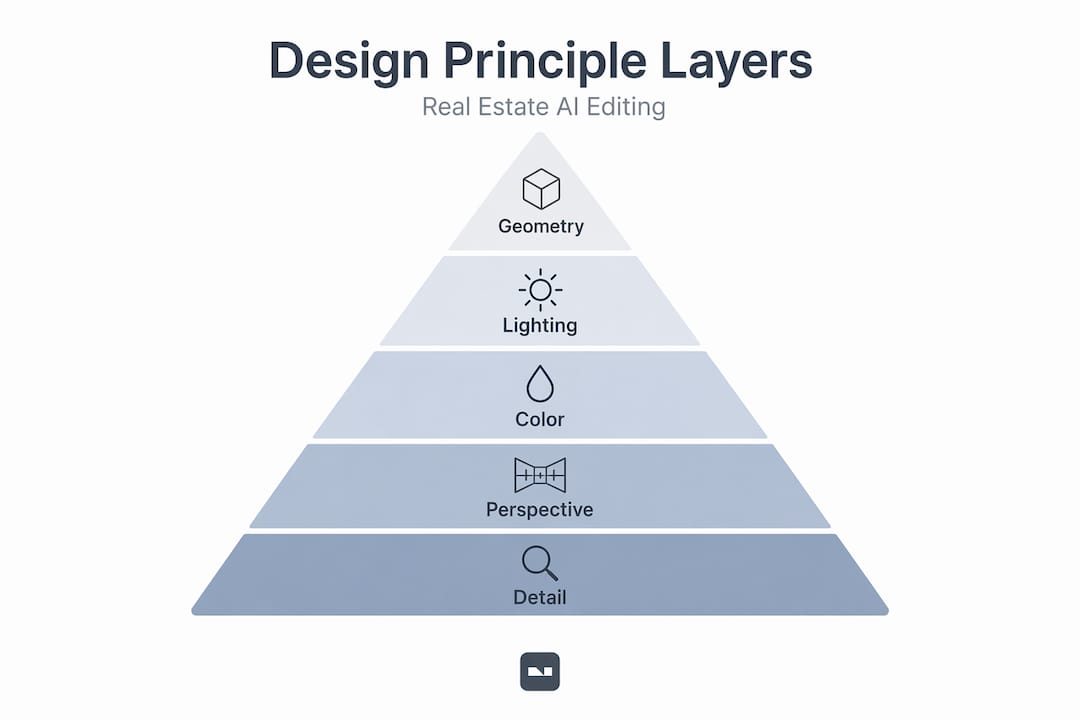
Here is how each principle maps to practical outcomes:
| Design principle | What it controls | Risk if ignored |
|---|---|---|
| Geometry and perspective | Room shape, wall alignment, vanishing points | Misleading spatial layout |
| Lighting alignment | Shadow direction, color temperature, exposure | Unrealistic or contradictory light |
| Scale and proportion | Furniture size relative to room dimensions | Inaccurate buyer perception of space |
| Brand and style intent | Color palette, material coherence, design style | Inconsistent listing presentation |
| Quality assurance | Artifact detection, resolution, edge accuracy | Compliance issues, buyer distrust |
Now, a numbered workflow that translates these principles into daily practice:
- Lock the geometry first. Before applying any AI edit, identify your reference points: door frames, window edges, and floor lines. Any change to materials, color, or furnishings should stay within those locked boundaries.
- Match existing light logic. If a room has a window on the left, every added light source and shadow should reflect that. AI tools with lighting alignment features enforce this automatically.
- Calibrate scale against fixed objects. Standard door heights (roughly 80 inches) and ceiling heights serve as reliable scale anchors. Use them to verify that AI-staged furniture sits at believable proportions.
- Set your style parameters upfront. Whether you are working with a minimalist Scandinavian aesthetic or a warm, traditional interior, define the palette and material constraints before generating any AI output.
- Run a QA pass every time. Even a quick 60-second review of edges, shadows, and surface textures catches the majority of artifacts before they make it to a listing.
Pro Tip: Before approving any AI-edited property image, zoom in to 100% resolution at three specific areas: corners where walls meet, window edges, and any AI-added furniture legs where they contact the floor. These spots reveal geometry and scale errors that look invisible at thumbnail size.
Understanding these principles is foundational, and the property photo enhancement guide as well as detailed editing steps for real estate provide practical frameworks to put them into action immediately.
How AI tool design puts users in control
The best AI photo editing tools are not the ones that produce the most dramatic transformations automatically. They are the ones that keep you, the professional, in charge of every decision that matters. This is a UX (user experience) philosophy, not just a feature list.
AI-assisted creative tools that prioritize user intent over raw output quality keep professionals in control through editable outputs and structured interaction. In concrete terms, that means:
- Editable outputs: Every AI change should be reversible and adjustable, not baked into a flat file.
- Multiple variations: Generating three to five versions of an edit lets you compare approaches and pick the one that best serves the property’s story.
- Feedback loops: The ability to refine an output through follow-up instructions, such as “make the light warmer” or “reduce the chair size by 15%,” keeps your creative direction intact.
- Explainable actions: Tools that show what changed and why, even briefly, build confidence and reduce error rates in high-volume workflows.
Here is a comparison of tool approaches that make this real:
| Feature | Basic AI tools | Professional AI tools |
|---|---|---|
| Output editability | Flat export only | Layer-based or prompt-based refinement |
| Variation generation | Single output | Multiple versions per prompt |
| Undo and version history | Limited or absent | Full history with branch options |
| Design constraint settings | None | Geometry lock, style presets |
| Feedback mechanism | Regenerate from scratch | Iterative refinement on existing output |
This distinction matters enormously in real estate workflows. Agents handling dozens of listings simultaneously cannot afford to regenerate entire image sets because one AI edit slightly misrepresented a kitchen island. Tools with iterative refinement capabilities protect both time and accuracy.
Pro Tip: Whenever evaluating a new AI editing tool, run a simple test: edit a room image, then try to reduce one change by 50% without touching the rest. If the tool cannot do that, it lacks the granular control you need for professional property work.
Optimizing your AI photo editing workflow around tools that offer this level of control pays dividends quickly, especially when combined with rapid photo editing solutions designed for the pace of real estate marketing.
Quality assurance: catching edge cases in property visuals
Speed is one of AI’s biggest advantages in property marketing. A listing image that would have taken a professional editor two hours to retouch can now be transformed in under a minute. But speed creates a specific trap: it encourages skipping review steps that would catch problems before they reach the public.

Batch workflows in AI real estate editing introduce their own category of risk. When dozens of images process simultaneously, errors that appear in one image often repeat systematically across the batch. A sky replacement algorithm that clips into a roofline on image three will likely do the same on images seven, twelve, and nineteen. Catching one error early protects the entire set.
The most common artifacts to watch for in batch property editing:
- Sky merge errors: AI-replaced skies that bleed into rooflines, tree branches, or upper-floor windows, creating an unnatural cutout effect.
- HDR merge artifacts: Blending errors from high dynamic range processing that produce halo effects around window frames or blown-out highlights in bright rooms.
- Floor reflection inconsistencies: AI-applied floor finishes that generate reflections misaligned with the room’s actual light sources.
- Color calibration drift: Batch processing can shift the white balance across a series, making rooms in the same property look like they belong to different homes.
Industry reality: Agents who skip systematic QA on batch AI edits report that artifact-related listing complaints account for a disproportionate share of buyer frustration before showings, a problem that is entirely avoidable with a structured review process.
A disciplined review routine does not need to be time-consuming. The goal is to protect editing speed while maintaining quality, not to rebuild the manual editing process that AI was designed to replace. Spot-checking 20% of a batch at full resolution, with specific attention to edges, sky transitions, and structural elements, catches the majority of systemic errors before they cause problems.
Enhancement vs. alteration: ethical boundaries in AI-driven property imagery
This is the conversation most AI tool marketing materials avoid, but it is the one that most directly affects your professional reputation and legal exposure. There is a meaningful and enforceable difference between enhancing a property image and altering it.
Acceptable enhancements under presentation editing can cross into disclosure-sensitive territory when the changes affect how buyers interpret the property, and local real estate rules often require that synthetic or structural changes be disclosed separately from standard photographic improvements.
The practical line sits here:
Acceptable enhancements:
- Adjusting brightness, contrast, and color temperature to reflect the property’s actual appearance under better conditions.
- Removing temporary clutter, like moving boxes or cleaning supplies, that would not be present during a showing.
- Sky replacement to reflect typical daytime sky conditions, without implying a view the property does not have.
- Virtual staging in empty rooms, provided it is labeled as such in the listing.
Alterations requiring disclosure or avoidance:
- Adding structural elements that do not exist, such as a fireplace, built-in shelving, or a pool.
- Removing permanent features that buyers would encounter, such as power lines, neighboring buildings, or road infrastructure.
- Digitally extending room dimensions to suggest more floor area than exists.
- Changing exterior materials or landscaping to imply a condition the property has not achieved.
Pro Tip: Keep a simple edit log for every property listing. Record the original file name, the type of AI edit applied, and whether the change was a presentation enhancement or a staging addition. This 30-second habit creates a compliance record that protects you if a buyer or regulator later questions a listing image.
Maintaining this discipline protects you, supports buyer trust, and keeps your property visuals editing practice aligned with both ethical standards and legal requirements.
What most guides miss: structural control and user agency matter more than AI “magic”
Here is a perspective you will not find in most AI tool marketing: the most impressive-looking AI output is often the most dangerous for professional use. Tools that automate everything, selecting styles, adjusting lighting, staging rooms, and enhancing exteriors all in a single click, tend to produce results that look spectacular in demos and fall apart in real-world deployment.
The reason is structural. Fully automated pipelines make decisions at every step of the editing process without surfacing those decisions to the user. When something goes wrong, and it will, professionals have no audit trail, no obvious intervention point, and no reliable way to correct just the problem without regenerating the entire image.
The tools worth building your workflow around are the ones that treat design as structure-level control, not pixel-level prediction. The difference is not subtle. A probabilistic model that “redraws” a room based on a style prompt is doing something fundamentally different from a system that locks your geometry, respects your lighting logic, and applies changes within defined constraints. The first produces impressive unpredictability. The second produces reliable professional results.
From experience working with real estate agents and interior designers at scale, the common thread in frustrating AI editing experiences is almost always the same: users chose a tool for its output quality in ideal conditions and discovered too late that they had no control when conditions were not ideal. A bathroom with an unusual tile layout, a living room with two competing light sources, or a kitchen with a complex ceiling structure will expose the limits of any tool that does not support explicit constraint management.
Pro Tip: Build your AI editing workflow around constraint enforcement first. Choose tools that let you lock geometry, define style parameters, and iterate on specific elements in isolation. These capabilities matter more than any single feature in the output quality department.
An efficient AI process for designers is one built for repeatability and professional-grade control, not just speed.
Seamlessly integrate design principles with next-generation AI tools
Knowing the principles is one thing. Having a tool that actually enforces them in your daily workflow is another challenge entirely.

VibeMyFlat is built specifically for real estate professionals and interior designers who need more than pixel-level automation. The platform’s natural language interface lets you describe exactly what you want: “adjust the wall color to warm white, keep the window geometry, and maintain the existing light direction.” The AI interprets those design constraints and applies changes accordingly, without distorting structure or guessing at your intent. With edits delivered in under 30 seconds across web, iOS, and Android, VibeMyFlat fits into the pace of real estate marketing without sacrificing the design discipline your listings demand. If you are ready to bring real design control to your AI editing process, start with VibeMyFlat and see the difference that structured AI makes.
Frequently asked questions
Which design principle is most important in AI photo editing for real estate?
Preserving geometry and perspective is the most critical, since geometry and structure distortions can mislead buyers about property layout and size in ways that damage trust before they ever visit.
How do I distinguish acceptable photo enhancements from misleading edits?
Enhancements adjust visuals without altering the property’s physical features, while misleading edits change elements that affect buyer interpretation. Presentation editing crosses into disclosure-sensitive territory when it alters how buyers understand what they are buying.
Can AI tools handle quality control at scale for batch editing?
AI accelerates batch editing dramatically, but QA in batch workflows still requires manual spot-checking to catch systemic artifacts like sky merge errors or HDR inconsistencies that AI does not flag automatically.
Why should AI photo editors offer multiple output variations?
Multiple variations give professionals genuine creative control, letting them match outputs to style needs or branding requirements without starting over from scratch each time a direction changes.
How do AI tools maintain brand or style intent during editing?
The most effective tools let you define brand guidelines or style presets before editing begins, treating brand and style intent as explicit pipeline constraints rather than afterthoughts applied to a finished output.