Natural language editing for effortless interior photos
Natural language editing for effortless interior photos

TL;DR:
- Natural language editing allows homeowners to quickly modify interior photos using plain English commands, transforming images without technical skills. This technology leverages AI to automate complex edits, making real-time visualization accessible, fast, and user-friendly. Its strengths include speed and simplicity, while limitations involve ambiguous instructions and complex scenes; focusing on clear, single-element changes yields the best results.
Editing interior photos used to feel like learning a foreign language. Layers, masks, curves, color grading — the terminology alone was enough to make most homeowners close the app and give up. But something has shifted. You can now simply tell AI what you want changed, in plain English, and watch it happen in seconds. This guide explains exactly what natural language editing is, how it works for interior and home photos, what its real strengths and limitations are, and how you can start using it today to transform your property images without touching a single slider.
Table of Contents
- What is natural language editing?
- How does natural language editing work?
- Strengths, quirks, and limitations
- Examples for homeowners and property managers
- A practical view: Why intent and simplicity matter most
- Upgrade your interior photos easily with VibeMyFlat
- Frequently asked questions
Key Takeaways
| Point | Details |
|---|---|
| No skills needed | Describe changes in plain language and let AI handle the technical work. |
| Step-by-step simplicity | Edit interior photos by chatting with AI in a few straightforward steps. |
| Best for clear requests | Short, specific instructions deliver the most accurate and impressive results. |
| Handles real-world mess | Natural language editing is ideal for decluttering, changing colors, or staging rooms for listings. |
What is natural language editing?
Natural language editing means describing the changes you want in everyday language, and letting AI figure out the rest. Instead of selecting a paint bucket tool, adjusting opacity, and matching hex color codes, you just type something like “change the walls to a warm sage green” and the AI handles every technical step behind the scenes.
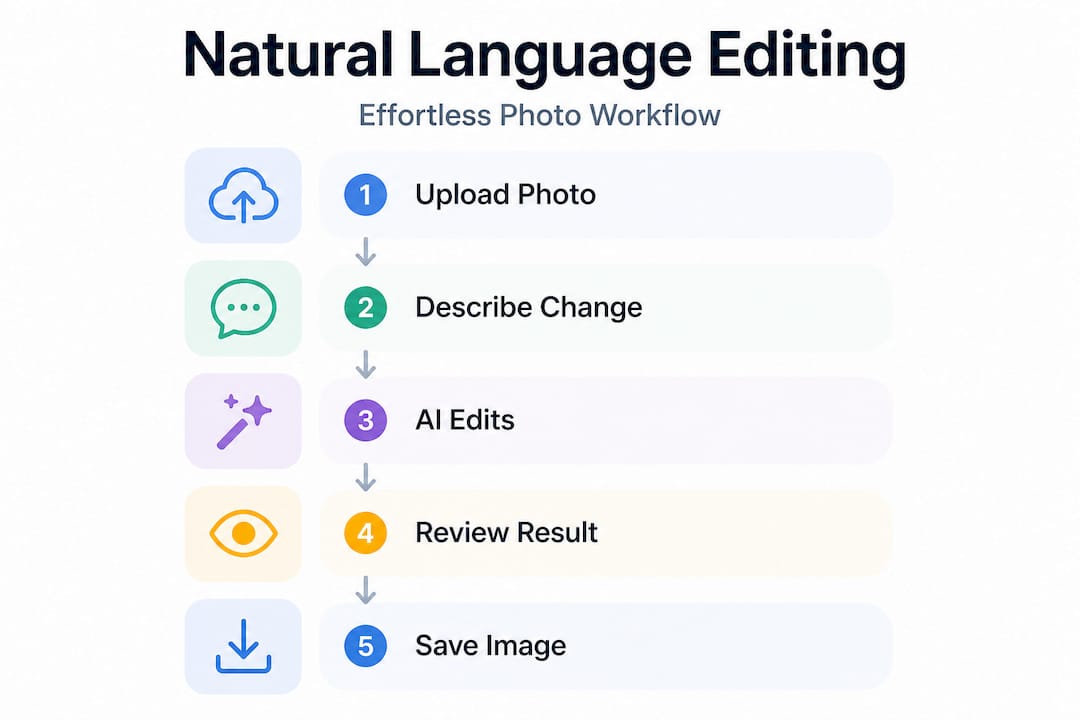
This is a fundamental shift from traditional photo editing. Programs like Photoshop or Lightroom require you to understand tools, file formats, and color theory. Natural language editing tools work more like a conversation. You describe your intent, the AI parses your meaning, selects the right tools internally, applies the changes, and returns a new version of your image. As AI photo editing works through this kind of conversational interface, users can iterate in real time, making one change at a time until the image looks exactly right.
For homeowners and property managers, this is huge. You don’t need to hire a photographer for every edit. You don’t need to spend an afternoon watching tutorials. You just need to know what you want the final image to look like, which is something you already know.
Here’s a quick comparison to make the difference concrete:
| Feature | Natural language editing | Traditional photo editing |
|---|---|---|
| Skill required | None | Moderate to advanced |
| Time per edit | Under 30 seconds | 10 to 60 minutes |
| Interface | Plain language chat | Tools, panels, sliders |
| Best for | Quick changes and visualization | Pixel-perfect professional work |
| Learning curve | Almost zero | Steep |
Some of the most common natural language commands for interior photos include:
- “Brighten the living room and make it feel warmer”
- “Remove the boxes in the corner”
- “Change the kitchen cabinets to white”
- “Replace the flooring with light oak hardwood”
- “Make the bathroom look cleaner and more modern”
Each of those instructions requires real technical work under the hood, but you never see it. For a deeper look at how this technology works across different platforms, the natural language photo editing guide from VibeMyFlat is a solid starting point. You can also read more about how automated photo editing applies these principles specifically to interior spaces.
How does natural language editing work?
Having introduced what sets this technology apart, let’s walk through exactly how you use it in practice. The process is straightforward, and once you do it once, it feels completely natural.
- Upload your interior photo. Most platforms accept standard JPG or PNG files taken from a phone camera. You don’t need a professional shot to get started.
- Type your instruction in plain English. Use simple, specific language. “Make the walls light gray” works better than “change the color scheme.”
- The AI parses your intent. Behind the scenes, the system identifies what element you’re referring to, what change you want, and which internal tools to use. The AI parsing process involves selecting the right editing tools automatically based on the described action.
- The edited image is returned, usually in seconds. You can view the before and after, accept the result, or keep iterating.
- Tweak via chat. If the first result isn’t perfect, just type another instruction. “Make it a bit darker” or “the tone looks too blue, warm it up” — both work.
A real-life example: imagine you’re preparing a rental listing and want to see how the living room would look with navy accent walls instead of the current beige. You upload your photo, type “change the accent wall to navy blue,” and within 30 seconds you have a realistic preview. You can then show that version to your property partner, share it in your listing, or use it to guide the actual painter. No design software needed.
To make this process even more efficient, check out how to streamline your AI photo editing workflow for real estate and rental contexts. And if you want a step-by-step walkthrough for specific room types, the guide on editing interior photos with AI covers common scenarios in detail.
Pro Tip: Keep each instruction focused on one element at a time. Instead of typing “brighten the room, remove the clutter, and change the floor color,” break those into three separate steps. You’ll get cleaner results and more control over each change.
Strengths, quirks, and limitations
With the basics clear, it’s just as important to know where natural language editing shines, and where to watch for quirks.
Key strengths:
- No design skills needed whatsoever
- Fast turnaround, often under 30 seconds per edit
- Intuitive interface that feels more like texting than using software
- Great for quick visualization before committing to real renovations
- Accessible from a phone or browser, no expensive software to install
Known limitations and edge cases:
- Ambiguous instructions can lead to unexpected results (“make it look cozier” is harder to parse than “add warm lighting”)
- Highly complex edits involving many overlapping elements can cause slight visual drift
- Very dark or blurry source photos may reduce output quality
- The AI may occasionally over-edit if the instruction is too broad
When it comes to multi-step editing, multi-turn editing research shows that AI tools generally handle context and even minor typos well, but longer edit chains may cause the image to drift from your original intent. Each iteration builds on the last, which is great for progressive refinement, but doing ten edits in a row on the same image introduces more risk than doing two or three focused ones.
| Strength | Edge case to watch |
|---|---|
| Fast and intuitive | Broad instructions get vague results |
| Preserves original context | Long edit chains may drift |
| Handles typos and phrasing variations | Complex overlapping elements may confuse AI |
| Great for staging and visualization | Very dark photos reduce accuracy |
If you want a broader understanding of what AI can do for your photos, the AI guide for natural language editing explains the technology in plain terms. For more on how this directly improves the way spaces look on screen, the article on visualization benefits of AI photo editing is worth reading.
Pro Tip: Edit in short, focused steps. A sequence of three precise instructions will almost always outperform one long, complex request. Think of it as having a conversation, not writing a thesis.
Examples for homeowners and property managers
Having covered what you can expect, let’s bring natural language editing to life with scenarios you might actually face.
Scenario 1: Declutter a living room for a listing photo. You have a nice space but the photo shows a pile of mail on the coffee table, a dog bed in the corner, and shoes near the door. Instead of restaging the room and reshoot, you type “remove the clutter from the coffee table and the items near the door.” The result is a clean, inviting image ready for your listing within a minute.
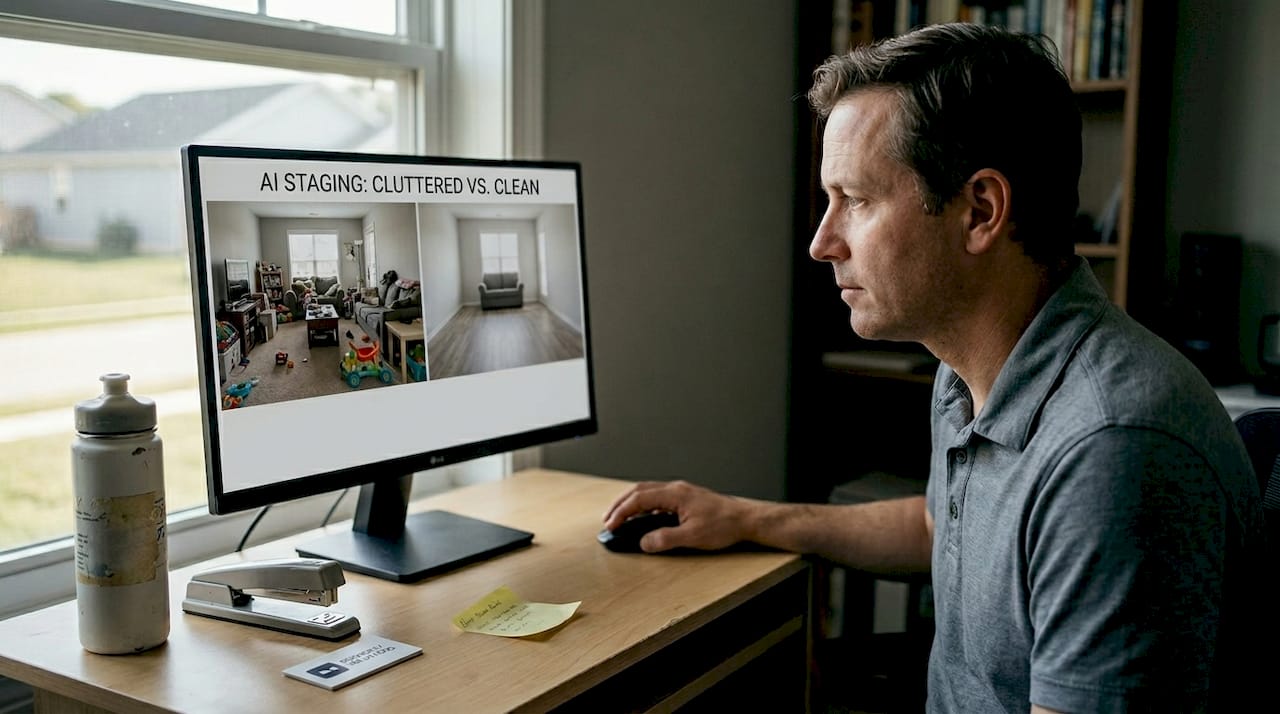
Scenario 2: Preview flooring or paint before you spend money. You’re thinking about replacing your tired gray carpet with light hardwood. Instead of guessing, upload a room photo and type “replace the gray carpet with light oak hardwood flooring.” You get an instant, realistic preview that helps you decide whether the look is actually what you imagined. This is one of the most powerful uses of the technology because it removes buyer’s remorse from renovation decisions.
Scenario 3: Virtual staging for rental or sales listings. Empty rooms notoriously underperform in listings. Buyers and renters struggle to visualize scale and potential. Type “add a modern sectional sofa and a floor lamp to the living room” and the AI will render a furnished version of the space. Research consistently shows that staged listing photos help properties sell and rent faster than empty or cluttered ones.
Here are specific phrases that consistently work well:
- “Remove the pet items from the room”
- “Make the walls lighter and brighter”
- “Add natural light coming through the windows”
- “Change the countertop to white marble”
- “Make the bedroom feel more minimal and modern”
These prompts work because they are specific about what to change, and they describe an outcome rather than a technical process. For more practical examples suited to apartment interiors specifically, the guide on user-friendly editing for apartments covers dozens of real-use cases.
“No photo skills? Just type what you want — AI does the rest.”
It really is that simple. The conversational interface means homeowners and property managers can make quick, professional-quality enhancements without needing any design background at all.
A practical view: Why intent and simplicity matter most
After seeing what natural language editing offers, here are some hard-won lessons from testing these tools in real-world scenarios.
The most common mistake is assuming that more instructions equal better results. In practice, the opposite is often true. When you pile five changes into one message, the AI has to balance competing priorities, and the result often looks slightly off. The users who get the best results are not the ones who write the most detailed prompts. They’re the ones who know exactly what one thing they want to change before they type anything.
Intent is the new skill. In traditional photo editing, your skill was measured by your ability to use tools. In natural language editing, your skill is measured by your clarity of vision. Can you articulate what the space should feel like? Can you identify the single element that would make the biggest visual difference? That’s the new expertise, and it’s something any homeowner already has.
Benchmark testing confirms that AI tools are remarkably good at preserving image integrity across short edit chains, but that precision drops with complexity. The recommendation from real testing is clear: short chains, specific goals, and iterative refinement.
This is actually good news for property managers and homeowners. You don’t need to know everything upfront. You start with the most important change, evaluate the result, then make one more targeted adjustment. This incremental approach is faster, cleaner, and far less frustrating than trying to get everything right in a single, overloaded instruction.
One more thing: before you start editing, take 30 seconds to look at your photo and identify the one element that would make it dramatically better. A cluttered surface? Dingy lighting? An outdated floor? Lock onto that target first. The professional editing steps used in real estate photography all follow this principle of prioritizing high-impact changes first.
Pro Tip: Before you start an editing session, write down exactly what element you want to change and what the result should look like. Stop editing as soon as that element looks right. Knowing when to stop is just as important as knowing where to start.
Upgrade your interior photos easily with VibeMyFlat
If you’re ready to try these concepts yourself, here’s how to get started in just a few clicks.
Everything covered in this article — the simplicity, the speed, the plain language instructions — is exactly how VibeMyFlat works. You upload your interior photo, type what you want changed, and get a professional-quality result in under 30 seconds. No design background needed. No software to install.

Whether you’re preparing a rental listing, previewing a renovation idea, or staging a property for sale, VibeMyFlat is built for exactly these situations. The platform handles everything from wall color changes to virtual staging to lighting adjustments. For a full picture of what’s possible, the guide on automated interior photo editing shows the range of transformations you can achieve. Try it from your phone or browser — no account required to get started.
Frequently asked questions
Can I use natural language editing on any photo?
Most home and interior images work well as long as you can upload them clearly and your instructions describe a specific change. The upload and instruction process is designed to be straightforward, but very low-resolution or heavily blurred photos may limit the quality of results.
What if the AI gets my edit wrong?
Simply type a follow-up correction, such as “make it a bit warmer” or “that’s too dark, lighten it slightly.” Multi-turn editing handles context and clarification well, so iterating with short, simple instructions usually gets you exactly where you want.
How secure is my photo when I upload it for editing?
Most reputable platforms handle uploads securely with encryption in transit and at rest. Always check the platform’s privacy policy before uploading any photos of your home, especially if they show identifiable features of your property.
Does this work on rooms with lots of furniture or clutter?
Yes, instructions like “remove the clutter from the floor” or “make the room brighter” are well-supported. The conversational interface is designed for exactly these kinds of practical home and interior scenarios, making it effective even in busy or complex rooms.