What is rapid photo editing: AI solutions for real estate
What is rapid photo editing: AI solutions for real estate

Rapid photo editing has transformed how real estate agents and interior designers enhance property images, cutting editing time from hours to seconds. AI-driven platforms now deliver professional-quality results instantly, enabling you to stage properties virtually, fix lighting issues, and test design styles without complex software. This guide explains what rapid photo editing is, how AI powers these tools, and why mastering these techniques gives you a competitive edge in property marketing and client presentations.
Table of Contents
- Key takeaways
- Core mechanics of rapid photo editing in real estate and design
- Editing methodologies and challenges: balancing speed and quality
- Expert nuances and best practices for optimal results
- Practical applications and benefits for real estate agents and interior designers
- Explore VibeMyFlat: your AI photo editing partner
- Frequently asked questions
Key Takeaways
| Point | Details |
|---|---|
| AI driven editing | AI driven editing speeds up workflows by performing object removal, lighting tweaks, sky replacement, virtual staging, color correction, HDR merging and upscaling in seconds. |
| MLS compliant staging | MLS compliant virtual staging helps agents accelerate sales by ensuring listings meet technical requirements. |
| Iterative design testing | Interior designers can test multiple styles quickly using AI prompts and presets. |
| Batch and hybrid workflows | Batch processing and hybrid AI human reviews boost efficiency while preserving quality. |
Core mechanics of rapid photo editing in real estate and design
Rapid photo editing relies on AI algorithms trained on millions of interior images to understand spatial relationships, lighting principles, and design aesthetics. When you upload a property photo, these systems analyze the scene within milliseconds, identifying objects, surfaces, lighting conditions, and architectural features. The AI photo editor app for interior design then applies targeted enhancements based on your instructions or preset parameters.
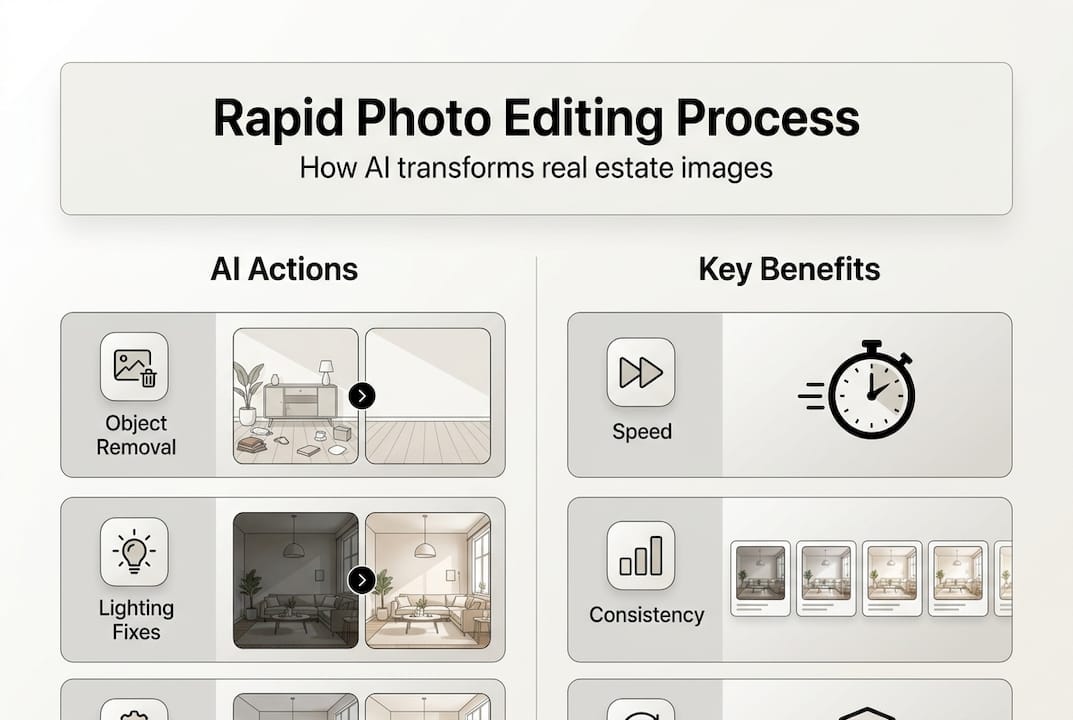
Key operations include object removal for decluttering spaces, exposure correction to balance harsh shadows or blown-out windows, sky replacement to transform dull exteriors, and virtual staging to add furniture that matches the property style. Color correction ensures walls and surfaces appear true to life, while HDR merging combines multiple exposures for balanced interior-exterior shots. Upscaling to 4K resolution maintains image quality for large format marketing materials.
Processing speeds vary by complexity but typically range from 5 to 30 seconds per image. Simple lighting adjustments take 5 to 10 seconds, object removal requires 10 to 20 seconds, and virtual staging with multiple furniture pieces processes in 20 to 30 seconds. Batch operations can handle 50 to 100 images simultaneously, reducing total workflow time by 80% compared to manual editing.
Pro Tip: Always process a test image first to verify AI output quality before committing to batch operations on an entire property shoot.
The technical foundation includes convolutional neural networks for image recognition, generative adversarial networks for creating realistic additions like furniture or lighting effects, and transformer models for understanding natural language prompts. These systems learn from professional editing patterns, applying industry-standard techniques automatically. For real estate agents, this means listing photos meet MLS technical requirements without manual adjustments. Interior designers gain the ability to visualize client requests instantly during consultations.
| Edit Type | Processing Time | Common Use Case |
|---|---|---|
| Lighting correction | 5-10 seconds | Balancing exposure in mixed-light rooms |
| Object removal | 10-20 seconds | Eliminating clutter or personal items |
| Virtual staging | 20-30 seconds | Adding furniture to empty spaces |
| Sky replacement | 8-15 seconds | Enhancing exterior curb appeal |
| Batch processing | 3-5 min for 50 images | Entire property shoot enhancement |
These mechanics enable you to deliver client-ready images immediately after shooting, eliminating the traditional wait for post-production. Real estate agents can list properties the same day as photography, while interior designers present multiple style options during initial client meetings. The speed advantage translates directly to faster sales cycles and higher client satisfaction.
Editing methodologies and challenges: balancing speed and quality
Professionals employ four primary methodologies: prompt-based editing using text descriptions, one-click presets, batch processing, and hybrid AI-human review for complex cases. Prompt-based editing offers maximum flexibility, letting you describe desired changes in natural language like “brighten the kitchen and remove the trash can.” One-click presets apply predetermined enhancement formulas optimized for specific property types or design styles. Batch processing applies consistent edits across entire image sets, maintaining visual coherence throughout a listing or portfolio.
Hybrid workflows combine AI speed with human judgment for luxury properties or high-stakes client presentations. You let AI handle technical corrections like exposure and color balance, then manually refine details that require aesthetic decisions. This approach delivers professional quality while maintaining the efficiency gains of automation.

Edge cases involve poorly lit interiors, reflections, complex object removals, and MLS compliance issues. Poorly lit spaces with multiple light sources create mixed color temperatures that AI can misinterpret, producing unnatural skin tones on walls or furniture. Window reflections require careful masking to remove photographer equipment without eliminating intentional mirror or glass elements. Complex object removal, like eliminating a large sofa that blocks architectural features, demands sophisticated inpainting algorithms to reconstruct hidden surfaces realistically.
MLS compliance presents unique challenges because listing standards prohibit misleading representations. Virtual staging must clearly indicate added furniture is digital, and enhancements cannot alter structural features or hide property defects. AI tools sometimes over-correct images, creating unrealistic perfection that violates disclosure requirements. You must verify that brightness adjustments don’t obscure wall damage and that color corrections don’t misrepresent finishes.
Pro Tip: Create a compliance checklist for AI edits: verify structural accuracy, confirm furniture labels in staged images, and compare before-after versions to catch over-corrections.
Authenticity challenges affect interior designers differently. Clients expect realistic visualizations that accurately predict renovation outcomes. AI-generated design elements must match available products and feasible construction methods. An AI might suggest a floating shelf configuration that looks stunning but violates building codes or material capabilities. You need domain knowledge to catch these issues before presenting concepts to clients.
Balancing speed with quality requires understanding when to trust AI and when to intervene. Routine corrections like exposure balancing and minor object removal work reliably with minimal oversight. Creative decisions about furniture placement, color schemes, and style direction benefit from your professional judgment. The AI photo editing methodologies you choose should match project scope: quick presets for volume listings, detailed prompts for signature properties, and hybrid review for client-facing design presentations.
Expert nuances and best practices for optimal results
Over-editing creates the telltale “plastic look” that undermines credibility. AI algorithms can over-smooth textures, eliminate natural shadows that provide depth, and boost saturation beyond realistic levels. Expert nuances include subtlety to avoid over-editing, hybrid AI plus human approach for luxury edits, and maintaining batch consistency. You should dial back AI intensity settings by 10 to 20% from maximum recommendations, preserving texture in fabrics, wood grain, and wall finishes.
Human oversight becomes essential for high-end projects where image quality directly impacts perceived property value. Luxury listings require perfect lighting that highlights architectural details without appearing artificial. Interior designers working with premium clients need flawless visualizations that inspire confidence in proposed designs. Allocate 5 to 10 minutes per hero image for manual refinement after AI processing.
Creating effective prompts:
- Be specific about desired changes: “lighten kitchen by 15%, remove appliances from counter” beats “improve kitchen”
- Reference design styles by name: “add mid-century modern furniture” produces better results than “add nice furniture”
- Specify preservation requirements: “maintain original wall texture” prevents over-smoothing
- Include technical parameters: “balance exposure without clipping highlights” guides AI processing
Batch management workflow:
- Sort images by room type and lighting conditions before processing
- Create custom presets for recurring property types in your portfolio
- Process one representative image per category to verify settings
- Apply batch operations to similar images only
- Review outputs at 100% zoom to catch artifacts or inconsistencies
- Flag outliers for individual attention rather than reprocessing entire batches
“The difference between good and great property photography is consistency. Every room should feel like part of the same home, with matching color temperature, exposure levels, and enhancement intensity.”
MLS compliance demands documentation of all virtual staging and material alterations. Maintain original unedited files, create a log of AI modifications applied, and include disclosure language in listing descriptions. Some MLS systems require watermarks on virtually staged images or separate galleries for edited versus original photos. Check your local MLS rules before deploying AI edits in active listings.
Brand style preservation matters for interior designers building recognizable portfolios. Your AI edits should reflect your signature aesthetic, whether that’s bright and airy Scandinavian minimalism or warm and textured bohemian eclecticism. Create custom presets that encode your style preferences, ensuring client presentations maintain visual consistency across projects. This builds brand recognition and streamlines your creative process.
Pro Tip: Build a reference library of your best AI edits with detailed prompt notes, creating a personal knowledge base that improves results over time.
Common pitfalls include inconsistent white balance across room sequences, unrealistic furniture scale in virtual staging, and visible AI artifacts like duplicated patterns or warped lines near edit boundaries. Address these by shooting with consistent camera settings, verifying furniture dimensions against room measurements, and using higher resolution source images that give AI algorithms more data for clean edits. The expert AI photo editing tips you develop through practice become your competitive advantage in crowded markets.
Practical applications and benefits for real estate agents and interior designers
Real estate agents gain immediate advantages through MLS-compliant virtual staging and lighting corrections that help listings sell 32% faster. Empty properties present poorly in online listings, failing to help buyers visualize living spaces. Virtual staging fills rooms with appropriate furniture at a fraction of physical staging costs, typically $25 to $50 per image versus $2,000 to $3,000 monthly for physical furniture rental. You can stage a three-bedroom home for under $500, updating images instantly if market feedback suggests different style approaches.
Lighting fixes solve the chronic problem of mixed interior and exterior exposures. Traditional photography captures either properly exposed rooms with blown-out windows or visible outdoor views with dark interiors. AI HDR merging balances both, creating magazine-quality images that showcase entire spaces. This capability particularly benefits properties with architectural windows or scenic views that represent key selling points.
Interior designers utilize prompt-based AI for fast iterative style testing with realistic results. During client consultations, you can demonstrate multiple design directions in real time, adjusting furniture styles, color palettes, and decor elements based on immediate feedback. A client uncertain about committing to bold jewel tones can see their actual space rendered in both saturated and muted versions, making informed decisions confidently.
This iteration speed transforms the design process from linear to collaborative. Instead of presenting one fully developed concept and hoping for approval, you explore options together, refining direction before investing time in detailed specifications. Clients feel ownership of the final design, reducing revision requests and project delays.
| Professional | Primary Benefits | Time Savings | ROI Impact |
|---|---|---|---|
| Real estate agents | MLS-compliant staging, faster listings, enhanced curb appeal | 5-8 hours per property | 32% faster sales |
| Interior designers | Client collaboration, style iteration, realistic visualizations | 10-15 hours per project | 40% more proposals accepted |
Real estate productivity improvements:
- Same-day listing activation after photography
- Reduced physical staging costs by 80 to 90%
- Ability to test multiple staging styles based on buyer demographics
- Enhanced social media marketing with scroll-stopping images
Interior design competitive advantages:
- Present concepts during initial consultations without prep time
- Demonstrate renovation potential to hesitant clients
- Test product selections in actual client spaces before purchasing
- Build portfolios showcasing diverse style capabilities
Both professions benefit from the credibility boost of professional imagery. Buyers and clients judge expertise partly on presentation quality. Polished, well-lit property photos signal attention to detail and professional standards. For interior designers, realistic visualizations that accurately predict outcomes build trust and justify premium fees. The AI tools for real estate and design you choose should support these professional positioning goals, not just provide technical editing capabilities.
The efficiency gains compound over time. Real estate agents handling 20 to 30 listings monthly save 100 to 150 hours annually on photo editing, time redirected to client acquisition and deal management. Interior designers completing 10 to 15 projects yearly eliminate 100 to 200 hours of manual rendering work, increasing capacity for additional clients without hiring staff. These productivity improvements directly impact revenue potential and work-life balance.
Explore VibeMyFlat: your AI photo editing partner
Now that you understand rapid photo editing principles and applications, consider how VibeMyFlat streamlines your workflow with AI-powered features designed specifically for real estate and interior design professionals. The platform delivers the virtual staging, lighting corrections, and batch processing capabilities discussed throughout this guide, processing edits in under 30 seconds while maintaining MLS compliance and design authenticity.

VibeMyFlat’s natural language interface lets you describe desired changes conversationally, eliminating the learning curve of complex editing software. Whether you need to stage an empty living room, brighten a dim kitchen, or test multiple design styles for a client presentation, the VibeMyFlat AI photo editor app handles technical execution while you focus on creative direction. The platform works across devices, letting you edit on-site during property visits or client meetings, delivering instant results that accelerate decision-making and approvals.
Frequently asked questions
What is rapid photo editing?
Rapid photo editing uses AI algorithms to enhance property and interior images in seconds rather than hours. The technology analyzes photos automatically, applying professional-grade corrections to lighting, color, composition, and content without manual adjustments in complex software. This enables real estate agents and interior designers to produce client-ready images immediately after shooting.
How does AI achieve both speed and quality in photo editing?
AI systems train on millions of professionally edited images, learning patterns that human editors apply. When processing your photos, these algorithms recognize scenes, identify issues like poor lighting or clutter, and apply corrections based on established best practices. The computational power of modern AI processes these complex operations in seconds, matching or exceeding human quality while eliminating time-consuming manual work.
What key features should I look for in rapid photo editing tools?
Prioritize platforms offering virtual staging with MLS-compliant labeling, exposure and color correction, object removal, batch processing, and natural language prompts for describing edits. Real estate agents need tools that maintain listing authenticity and meet disclosure requirements. Interior designers benefit from style iteration capabilities and realistic material rendering. The VibeMyFlat AI photo editing platform includes these essential features in one integrated solution.
How do I ensure AI edits comply with MLS standards and design authenticity?
Always maintain original unedited files and document all AI modifications applied. For virtual staging, verify your MLS requires proper labeling of digitally added furniture. Review AI outputs at full resolution to catch unrealistic corrections that misrepresent property conditions. Interior designers should confirm that AI-generated design elements match available products and feasible construction methods. When in doubt, apply conservative enhancement levels and seek human review for high-stakes projects.