Why use AI-driven design tools for home renovation
Why use AI-driven design tools for home renovation

TL;DR:
- AI-enabled interior design tools allow homeowners to create photorealistic room previews from photos within seconds, reducing costs and enabling rapid experimentation. These tools excel at visual adjustments like color swaps and furniture placement but cannot replace professional advice for structural or regulatory changes. Using AI for inspiration and early planning can streamline renovation ideas, but critical structural or safety decisions must involve licensed experts.
Imagine taking a photo of your living room, typing “make the walls sage green and swap the sofa for a mid-century modern sectional,” and seeing a photorealistic result in under 30 seconds. That is not a distant future scenario. AI-enabled room redesign tools have moved firmly into the mainstream, giving everyday homeowners and weekend DIYers the ability to experiment with bold design changes before spending a single dollar on paint, furniture, or contractors. This article walks you through how these tools work, why they matter, where they fall short, and how to pick the right one for your project.
Table of Contents
- How AI-driven design tools work for homeowners
- The main reasons to use AI-driven design tools
- Where AI tools excel—and where they don’t
- Choosing the right AI design tool for your project
- Why AI design tools are a game changer—but only when used wisely
- Ready to reimagine your space with AI design?
- Frequently asked questions
Key Takeaways
| Point | Details |
|---|---|
| Instant visual feedback | AI tools let you see design changes in seconds, reducing risk and saving time. |
| Affordable creative freedom | Homeowners can experiment with styles without hiring an expert right away. |
| Perfect for small updates | Use AI to explore decor, colors, and layout ideas before you renovate. |
| Not a pro replacement | AI is best for early-stage ideas—not for safety, structure, or major planning. |
| Choose tools wisely | Pick an AI design tool that matches your project’s needs and your own skill level. |
How AI-driven design tools work for homeowners
With AI becoming commonplace in home design, let’s break down exactly how these tools are changing the way homeowners approach renovations.
At the core, most AI design tools follow a simple loop: you upload a photo of your room, provide some kind of input (a text prompt, a style selection, or a mood board), and the AI generates a modified version of your space in seconds. The underlying technology uses large image models trained on millions of interior photos, design catalogs, and architectural references. The result is a system that understands what “Scandinavian minimalist” or “industrial loft” actually looks like in practice.
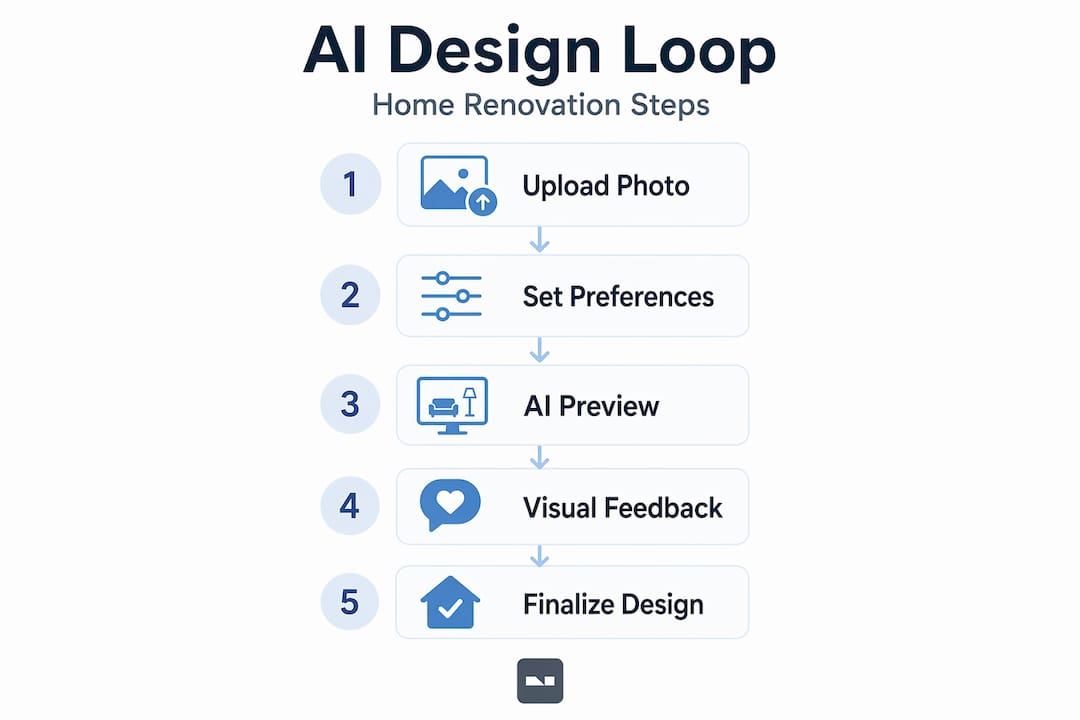
What makes this genuinely exciting for non-experts is the zero-risk experimentation factor. You are not moving furniture or buying paint samples. You are seeing a realistic preview of a change before committing any time or money. That shift alone is enormous. Previously, visualizing a renovation meant either hiring a designer to produce renderings or relying entirely on your imagination.
Here is a quick look at what modern AI design tools typically offer:
- Photo-based room transformation: Upload a snapshot from your phone and the AI reworks the space based on your description.
- Style and mood suggestions: Tools often suggest complementary palettes, textures, and furniture styles based on your existing room.
- Multiple iteration speed: Generate five different versions of the same room in the time it would have taken to sketch one rough idea by hand.
- Natural language input: Describe changes in plain English rather than wrestling with complex software controls.
- Cross-device access: Most platforms work on desktop browsers as well as iOS and Android apps, so you can experiment anywhere.
The adoption curve has been steep. A growing number of homeowners now treat an AI preview as a standard first step before any visible renovation, much like checking a weather app before planning an outdoor event. For innovative AI design ideas, the barrier to entry has never been lower.
| Feature | Traditional design process | AI-driven tools |
|---|---|---|
| Time to first visual | Days to weeks | Under 60 seconds |
| Cost for early concepts | $500 to $5,000+ | Often free or low-cost |
| Number of iterations possible | Limited by budget | Unlimited |
| Technical skill required | High (CAD, rendering software) | None |
| Accessible on a smartphone | Rarely | Yes |
The numbers reinforce the trend. Homeowners who use visual previews before committing to a renovation report fewer regretted purchases and a stronger sense of control over the final outcome. That confidence compounds throughout the whole project.
The main reasons to use AI-driven design tools
Now that you understand what these tools do, let’s look at the major reasons homeowners are adopting AI-driven solutions.

Speed is the headline benefit. What once required a weekend of browsing Pinterest boards and furniture catalogs now collapses into minutes. You can explore a farmhouse kitchen, a sleek urban kitchen, and a colorful eclectic kitchen side by side within a single afternoon. That speed does not just save time. It actively expands your creative range because you are not penalized for curiosity.
Cost reduction is equally compelling. Hiring an interior designer for initial concept work typically runs hundreds to thousands of dollars, depending on your market. AI tools give you a polished starting point for a fraction of that cost, or sometimes nothing at all. AI is actively reshaping home design by democratizing access to visual planning, a capability that was once reserved for clients with serious renovation budgets.
Visual feedback reduces costly mistakes. Think about the number of homeowners who painted an entire room a color that looked great on a swatch but overwhelming at scale. AI previews eliminate most of those surprises by rendering how a full room actually feels with that color on every wall.
Here is a step-by-step approach to getting the most value from an AI design tool:
- Photograph your space clearly. Good lighting and a wide angle shot give the AI more to work with and produce more accurate results.
- Start with one variable. Change the wall color first, then the furniture, then the lighting. Layering changes one at a time keeps results interpretable.
- Generate multiple versions. Do not stop at the first result. Request three to five variations on the same theme to identify what you truly like.
- Save everything you generate. Even the versions you reject carry useful information about what is not working in the space.
- Use the results as a reference when shopping. Bring your AI mockup to a furniture store or paint counter to match colors and finishes precisely.
Pro Tip: Before your first session with an AI tool, identify the single biggest visual problem in the room. Is it a dark, cramped feeling? A lack of cohesion? Clunky furniture scale? Starting with a clear problem sharpens your prompts and produces more useful results.
It is worth noting that AI tools serve as a starting point for small DIY aesthetic decisions, covering decor choices, style exploration, and visualization, but they are not designed to replace professional design expertise for complex structural projects. Knowing that boundary upfront sets you up to use them well. For a deeper walkthrough, the AI makeover guide and the detailed visualization benefits of AI are both worth bookmarking.
| Approach | Time investment | Cost | Result quality |
|---|---|---|---|
| Hire a designer for concepts | 1 to 4 weeks | $$$$ | High, but inflexible |
| DIY with mood boards | 2 to 5 days | $ | Medium, hard to visualize |
| AI design tools | Minutes | Free to $ | High, instantly revisable |
| Gut-feel purchasing | Immediate | Varies | High risk of regret |
Where AI tools excel—and where they don’t
AI tools offer powerful advantages, but it is just as important to understand their boundaries before you dive in.
AI design tools are genuinely excellent at anything that is primarily visual and aesthetic. Changing a wall color, swapping out furniture, testing a new lighting scheme, experimenting with flooring materials, or layering textiles and artwork. These are all areas where the AI model has strong training data and can produce reliably useful previews. Exploring types of redesign ideas through AI is one of the fastest ways to build your design vocabulary without any professional background.
Here is where AI tools perform well:
- Color and paint visualization across full rooms, not just swatches
- Furniture placement and scale testing before any heavy lifting
- Style direction when you are unsure whether you lean contemporary, traditional, or eclectic
- Lighting mood previews that show how a space changes from bright whites to warm ambers
- Decor layering to see how rugs, curtains, and accessories combine
However, the limits are real and worth understanding clearly.
“AI cannot reliably handle building-code, structural, and other engineering constraints; relying on AI visuals alone can lead to incorrect or unsafe outcomes.” — Spaces by Dee
That warning covers a wide territory. If you are thinking about removing a wall, adding a window, rerouting plumbing, or rewiring electrical circuits, an AI visual cannot tell you whether any of those changes are structurally safe or legally permitted. The image might look beautiful. The reality could be dangerous or extremely expensive to undo.
Here is where AI tools fall short:
- Structural feasibility: A rendered open floor plan does not mean the wall between your kitchen and living room can actually be removed.
- Building code compliance: AI has no knowledge of your local zoning laws, permit requirements, or fire safety codes.
- Contractor-ready planning: AI outputs are not construction documents and should not be treated as such.
- Material costs and availability: A gorgeous rendered finish might not exist in the materials available in your region at any price point.
Pro Tip: Use AI previews to get excited and aligned on a direction, then bring that image to a licensed contractor or structural engineer before making any changes that affect walls, ceilings, floors, or utility systems. The preview starts the conversation. The expert confirms what is actually possible.
The expert analysis of AI design limits reinforces this point consistently. Treat AI as your creative collaborator in the early, exploratory stage of a project, and you will get enormous value from it. Treat it as a blueprint and you are asking for trouble.
Choosing the right AI design tool for your project
With strengths and limits in mind, here is how to zero in on the best AI tool for your own renovation ambitions.
There is no single tool that wins across every project type and user need. Evaluations show that scoring rubrics tend to emphasize output quality, controllability, revision workflow, and trust and transparency rather than crowning one tool as universally best. That is actually useful information. It means you should match the tool to the job rather than searching for a definitive winner.
Consider these criteria when evaluating any AI design platform:
- Output quality: Does the generated image look photorealistic enough to help you make real decisions?
- Controllability: Can you specify exactly what changes and what stays the same, or does the AI rework things you wanted to preserve?
- Revision workflow: How easy is it to tweak a result and generate a new version? A clunky process kills momentum.
- Natural language vs. menu-driven input: Some tools use text prompts while others rely on dropdowns and presets. Pick the style that fits your thinking.
- Trust and transparency: Does the platform explain what it changed and why? Transparency builds confidence in the output.
- Platform and device fit: A tool you will actually use on your phone during a Saturday shopping trip beats a theoretically superior desktop app you never open.
| Criteria | What to look for | Red flag |
|---|---|---|
| Output quality | Photorealistic textures and lighting | Flat or cartoonish renders |
| Controllability | Selective editing by room element | Whole-room overhaul every time |
| Revision speed | New version in under 60 seconds | Waiting minutes per iteration |
| Input method | Natural language text prompts | Complex sliders or menus only |
| Device access | iOS, Android, and browser | Desktop only |
For homeowners focused on style exploration and early visualization, a tool with strong text prompt capability and fast iteration is usually the right fit. For those planning a specific furniture layout, look for tools that let you place and scale objects accurately. If you are comparing options, it is worth checking out Interiorai.com alternatives and other AI tool alternatives to see how different platforms handle your specific use case before committing to any one platform.
The best approach is to test two or three tools on the same room photo and compare the outputs side by side. Your own eye is the most reliable judge of which tool’s aesthetic sensibility aligns with yours.
Why AI design tools are a game changer—but only when used wisely
Here is our candid take on when and how to fully harness AI-driven design tools without falling for the hype.
The most significant shift AI brings to home renovation is not the technology itself. It is the permission to think bigger. When generating a new idea costs nothing and takes 30 seconds, homeowners stop self-editing before they start. They explore directions they would have dismissed as too risky, too expensive, or too unconventional. That creative expansion is genuinely transformative.
But there is a trap built into the same speed that makes these tools so powerful. A beautiful AI render can feel like a done deal. You see a stunning open-concept kitchen on your screen and your brain starts treating it as real, skipping the crucial step of verifying whether the project is even feasible. We have seen this pattern play out in renovation planning repeatedly. The visual is compelling, the excitement builds, and the practical questions get pushed to the back of the line.
The smart way to use AI is to treat it as a front-end investment in clarity. Use it aggressively during the inspiration and pre-planning phase to narrow your choices and crystallize your vision. Check AI’s visual impact on how that clarity translates into faster, more confident decisions downstream. Then, once you know what you want, bring that clarity to the professionals who can make it real safely and correctly.
The renovators who get the most out of these tools treat them like a creative partner, not an authority. They use AI to generate the question, “What if my bedroom looked like this?” and they use a contractor or designer to answer the follow-up, “And can it?” That two-step process captures all the speed and creativity benefits of AI while keeping real-world constraints firmly in view. Ignoring either half of that equation costs you either creativity or money, and sometimes both.
Ready to reimagine your space with AI design?
If reading this article sparked ideas about your own home, there is no better time to act on that energy than right now.

VibeMyFlat makes it easy for any homeowner or DIY renovator to go from a phone photo to a photorealistic redesign in under 30 seconds. Just describe what you want to change in plain English and watch the AI apply it instantly. No design background required, no software learning curve, and no waiting around. Whether you are testing a new color palette, rethinking your furniture layout, or exploring a completely different style direction, you can start your AI makeover today on any device. It is the fastest way to turn a vague renovation idea into something you can actually see, evaluate, and act on.
Frequently asked questions
Can AI design tools replace human interior designers?
AI tools are excellent for fast ideas and style experiments, but they should not replace professionals for complex or structural renovations where expertise, code compliance, and safety judgment are essential.
What types of renovations work best with AI-driven tools?
AI tools shine brightest for small DIY aesthetic decisions like visualizing color schemes, furniture arrangements, decor layering, and early-stage style planning before any physical work begins.
Are there risks to using AI for home renovation planning?
Yes, because AI cannot assess building codes or structural safety, so any major changes involving walls, electrical, or plumbing should always be reviewed by a licensed professional.
How do I choose the best AI interior design tool?
Instead of searching for a single winner, evaluate tools by metric and match their strengths, such as output quality, controllability, and revision workflow, to your specific project needs.